Multi-Vendor & Complex SaaS Marketplaces
 Modern Headless & Jamstack Web Development
 High-End Corporate & Specialized Business Websites
 Advanced API, Checkout & Database Troubleshooting
Shopify POS Retail Integrator Williamstown, Victoria
Unify online and in-store sales with Shopify POS integration built for Williamstown, Victoria retailers.
We configure hardware, inventory sync, payments, and staff workflows so waterfront boutiques, café counters, and high-street shops stay accurate during weekend foot traffic. Smart Solutions. Human Support.—enterprise setup with plain-English coaching for your floor team.
Power up your support: dial 0421498927 or visit fixwebnode.com.au/contact-support.
- Fixed-scope POS + Shopify store linking
- On-site or remote setup for Williamstown stores
- Patient staff walkthroughs included
About this service
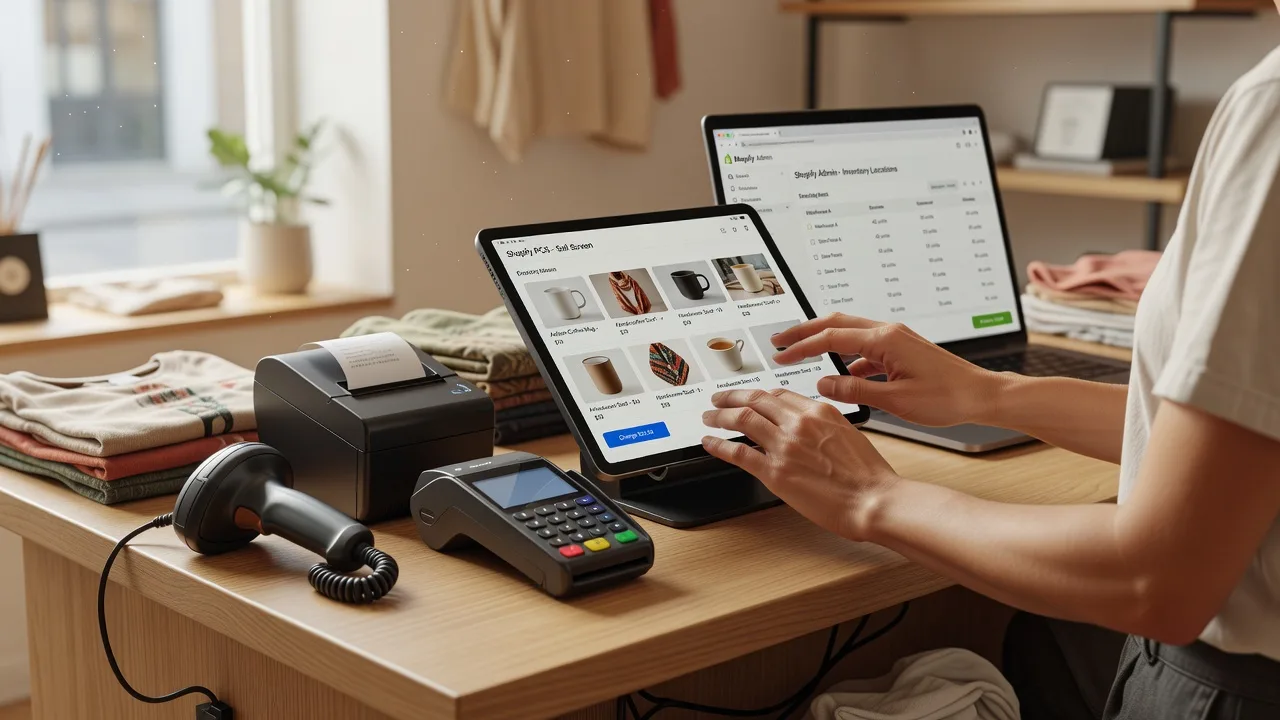
Get a clean Shopify POS retail integration that keeps stock, payments, and click-and-collect aligned for Williamstown, Victoria shops that cannot afford weekend outages. Fixwebnode Australia delivers the technical build and calm floor training under one direct provider—Smart Solutions. Human Support.
What You'll Get
- Shopify POS channel setup - Correct location, tax, and channel linking so online and counter sales share one inventory truth.
- Hardware & reader pairing - Card readers, receipt printers, barcode scanners, and cash drawers mapped to your Shopify admin without guesswork.
- Inventory & multi-location rules - Stock policies for back-of-house, click-and-collect, and transfer between store and warehouse.
- Staff permissions & POS profiles - Role-based access so casuals cannot edit cost prices or open risky discounts.
- Payment & receipt polish - Tender types, tipping where needed, branded receipts, and gift-card / loyalty app checks.
- Floor training handoff - Jargon-free walkthrough so your team opens, sells, refunds, and closes confidently on day one.
Serving Williamstown, Victoria & surrounds
Williamstown’s mix of foreshore visitor traffic, Nelson Place hospitality, and neighbourhood independents needs POS that survives Saturday surges and midweek quiet. We tailor Shopify POS for counter-service cafés, fashion and homeware boutiques, and service retailers who also sell online—plus practical support for stores trading toward Newport and Altona when stock is shared across sites.
- Waterfront and high-street boutiques juggling tourist peaks with local weekday trade
- Café and takeaway counters needing fast barcode/SKU flow and accurate end-of-day reporting
- On-site visits when cabling, Wi‑Fi dead zones, or reader pairing need hands-on work in-store
How We Work
- Step 1: Reach Out - Tell us your Shopify plan, current POS or till setup, hardware on hand, and whether you need remote configuration or an in-store session in Williamstown.
- Step 2: Tailored Plan - We scope a fixed quote for tech work and a clear support path for staff training—no bidding, no multi-vendor chaos.
- Step 3: We Deliver - We integrate Shopify POS, test sales/refunds/sync, harden permissions, and coach your team patiently on the live counter flow.
- Step 4: Confirm & Follow-up - Plain-English handoff notes, optional monitoring tweaks, and a follow-up check after your first busy trading window.
Expert Insights: What Most People Get Wrong
Based on 8+ years of Shopify retail integrations, here are the critical mistakes we still see on Williamstown counters—and how we fix them:
- Treating POS as a second store instead of one inventory system - Bad: creating duplicate products or a separate “POS only” catalogue that drifts from the online catalogue. Good: one product master, location-level available stock, and explicit pickup vs shipping rules so a Saturday Nelson Place sell-out cannot oversell online by Sunday morning.
- Skipping location and tax edge cases before go-live - Bad: launching with default tax or a single “Australia” location when you also fulfil from a secondary storeroom. Good: map each physical location, test GST-inclusive pricing on POS, and run a full dry-sale including partial refunds and exchanges before staff open the doors.
- Leaving staff on Owner-level PINs - Bad: every casual shares the owner login, so discount abuse and accidental product edits are invisible. Good: POS roles with locked cost fields, limited refund windows, and a manager override code—especially useful when weekend rosters mix permanent and casual staff.
- Ignoring Wi‑Fi and offline behaviour on the foreshore strip - Bad: assuming the POS will “just queue” when visitor density hammers the store network. Good: stress-test offline mode, confirm which orders queue when the link returns, and set a simple paper fallback for the rare outage so the queue never freezes mid-queue.
When you book Fixwebnode, you get direct professional support—infrastructure expertise and patient human help—without freelancers, bidding, or marketplace noise.
Why Choose Fixwebnode
Fixwebnode Australia is a direct two-tier provider: enterprise-grade Shopify and retail systems work, plus human digital support your team actually understands. We know Williamstown trading rhythms—from ferry-day spikes to quieter midweek restocks—and we stay accountable after go-live.
- ✓ Direct provider model: we implement and support the integration ourselves
- ✓ Blend of technical authority and calm, jargon-free floor coaching
- ✓ Local-aware setup for hospitality, boutique retail, and multi-channel independents
Tools & Technologies
Shopify Admin & POS (POS Lite / POS Pro patterns), Shopify Payments and compatible card readers, barcode scanners and receipt printers, inventory locations and transfer workflows, Shopify Flow where useful for alerts, staff PIN roles, app compatibility checks (loyalty, gift cards, bookings), network readiness checks, and plain-English SOP notes for open/close.
Perfect For
Williamstown independents moving from a standalone till to Shopify POS, multi-channel boutiques that need click-and-collect without stock fights, café owners adding merchandise, and small teams who want fixed-scope technical setup plus patient training. Ideal if you want one accountable provider—not a chain of handoffs—for both the systems work and the human side of adoption.
Choose a package
Remote Shopify POS channel check, core settings alignment, and a written go-live checklist for a single Williamstown location.
Full single-store Shopify POS integration including hardware pairing guidance, staff roles, test transactions, and remote team walkthrough.
Comprehensive multi-workflow Shopify POS rollout with on-site option in Williamstown, advanced inventory rules, SOPs, and post-launch follow-up.
FAQ
Both. Many Shopify POS integrations are completed remotely with screen-share configuration and staff coaching. When cabling, reader pairing, printer issues, or Wi‑Fi dead zones need hands-on work, we can arrange an on-site session for Williamstown stores and confirm access and timing up front.
Usually yes if the hardware is on Shopify’s supported list for your region and POS plan. We verify compatibility first, pair devices correctly, and test a full sale-to-receipt path. If a device is unsupported, we tell you plainly and recommend a clean alternative before you spend more.
That is the core goal. We set location-level inventory, prevent duplicate catalogues, and test oversell scenarios including click-and-collect. You leave with clear rules for what sells where, so a busy Saturday counter does not silently break your online availability.
We use patient, jargon-free walkthroughs focused on real counter tasks: open shift, sell, discount with approval, refund, and close. Training can be remote video or in-store, and we leave simple notes so casuals can follow the same flow without calling the owner every time.