Multi-Vendor & Complex SaaS Marketplaces
 Modern Headless & Jamstack Web Development
 High-End Corporate & Specialized Business Websites
 Advanced API, Checkout & Database Troubleshooting
Remove Malware & Clean Hacked WordPress Sites Remotely
Safe remote malware removal and full WordPress cleanup for business sites worldwide.
We restore compromised WordPress installs used by online retailers, clinics, and professional practices—strip backdoors, reinfection hooks, and spam injects without wrecking your theme or checkout. Work is delivered by our team directly, with clear change logs and hardening notes after every clean.
Need help now? Chat with us or visit fixwebnode.com.au/contact-support to power up your support path and lock a cleanup window.
- Full file, database, and user audit
- Malware signature + manual backdoor sweep
- Post-clean hardening and monitoring guidance
About this service
Get your hacked WordPress site cleaned safely and restored to trusted operation—remote malware removal built for live business sites that cannot stay offline for days.
What You'll Get
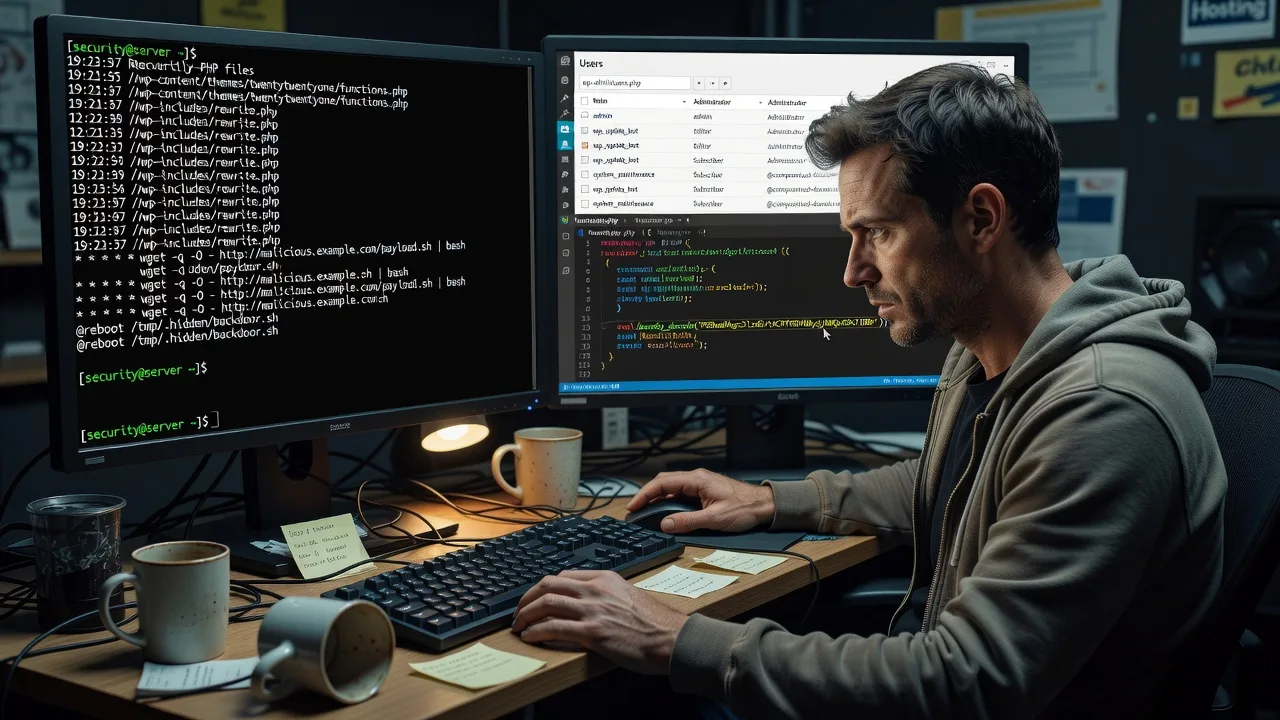
- Complete malware & backdoor purge - We hunt webshells, rogue cron jobs, base64 loaders, and hidden admin users across core, themes, plugins, and uploads.
- Database infection cleanup - Spam links, injected scripts, and redirect payloads stripped from posts, options, and widget tables without blanking your content.
- Core & plugin integrity restore - WordPress core and known-good plugin/theme files replaced from clean sources so modified entry points cannot linger.
- Hardening baseline - File permissions, wp-config secrets, XML-RPC risk, unused admins, and login surface reduced after the clean.
- Blacklist & SEO recovery support - Guidance to request Safe Browsing / host flag review and remove spam index pollution once the root cause is gone.
- Plain-English incident report - What got in, what we removed, and what to change so the same vector does not reopen next week.
Serving Remote & surrounds
This service is delivered remotely worldwide for owners who run WordPress as revenue infrastructure—not a hobby blog. Demand spikes around campaign launches, end-of-financial-year promo sites, and post-holiday plugin backlog when unattended updates leave known CVEs open. We work across time zones with staging-first cleans when your host allows, so checkout and booking funnels return without a full rebuild.
- E-commerce and membership stores hit by checkout redirects or fake "order" spam
- Clinic, telehealth, and professional-practice sites flagged for injected pharma or gambling links
- Agency-managed marketing sites needing a direct technical clean with a written handoff—no on-site travel required
How We Work
- Step 1: Reach Out - Share the domain, host panel access (or temporary credentials), symptoms (redirects, Google warning, defacement), and whether the site must stay partially live. We listen first and flag anything unsafe to change mid-incident.
- Step 2: Tailored Plan - You receive a fixed-scope quote (Basic / Standard / Premium) based on infection depth, multisite vs single, WooCommerce complexity, and blacklist status—not open bidding.
- Step 3: We Deliver - We snapshot or request a backup, isolate where practical, remove malware manually and with trusted scanners, restore integrity, and re-test critical paths (home, login, cart, forms).
- Step 4: Confirm & Follow-up - You get a plain-English report, password and key rotation checklist, optional monitoring or hardening follow-up, and clear next steps if the host still shows a residual flag.
Common Issues & How to Fix Them
These are patterns we see repeatedly on compromised WordPress estates—use the DIY checks only on a copy or when you can roll back; stop if you are unsure.
Homepage or random pages briefly redirect to spam / pharma / "your device is infected" sites
Often caused by a small eval or base64 snippet in a must-use plugin, theme functions.php, or an options-table row that only fires for non-logged-in visitors or certain user-agents—so admins miss it while browsing logged in.
- Step 1: Open the site in a private/incognito window (or curl from another network) and note exact redirect URLs; compare while logged into wp-admin to confirm visitor-only behaviour.
- Step 2: In hosting file manager or SFTP, check wp-content/mu-plugins, the active theme’s functions.php, and recently modified PHP in wp-content/uploads; search the database options and post_content tables for suspicious <script> blocks or eval(base64_decode patterns via phpMyAdmin if you are comfortable.
- Step 3: After removing obvious injects and re-saving permalinks, retest incognito plus a mobile user-agent; if redirects persist, do not keep deleting files at random—book a full clean before more backdoors spawn.
Google Search or host panel shows "hacked" / Safe Browsing warning but the homepage looks fine
Attackers frequently hide doorways as odd.php files under uploads, old theme folders, or cache directories, or inject spam only into XML sitemaps and secondary language paths that scanners index first.
- Step 1: In Search Console (if you have it), open Security & Manual Actions and note sample URLs; also download the latest access log and sort for odd POST/GET to unknown.php paths.
- Step 2: List files modified in the last 30–90 days under public_html; quarantine unknown PHP outside core/plugin paths, and disable unused themes/plugins rather than leaving abandoned code writable.
- Step 3: Request a recrawl only after malware is gone and passwords rotated; submitting a review while shells remain active almost always fails and wastes days.
New admin users, unexplained cron emails, or PHP mail floods after a plugin update
Privilege escalation or a nulled/pirated plugin often drops a hidden administrator, schedules wp-cron tasks that re-drop malware, and uses your server for spam—hosts then throttle or suspend the account.
- Step 1: Export the wp_users and wp_usermeta tables (or screenshot Users in wp-admin); flag any admin you did not create and any user with odd email domains.
- Step 2: In the host panel, review cron jobs and disable unknown wget/curl/php entries pointing at your domain; reset all admin passwords, salts in wp-config.php, and FTP/SFTP keys from a clean device.
- Step 3: Confirm mail volume drops and no new admins reappear within 24–48 hours; recurrence means a persistent file or database backdoor still exists and needs professional removal.
When DIY is not enough (urgent, unsafe, recurring, or burning time), book Fixwebnode for direct professional support—no freelancers, bidding, or marketplace noise.
Why Choose Fixwebnode
We clean WordPress as production infrastructure: careful order of operations, evidence-minded reporting, and hardening that matches how real attackers chain plugin CVEs with weak credentials. You work with us directly—remote, accountable, and scoped—so agency and in-house teams get a stable handoff instead of a mystery "it looks fixed" ticket.
- ✓ Direct provider cleanup with fixed package scopes—not a bid board
- ✓ Experience across WooCommerce, membership, and high-content marketing installs
- ✓ Post-incident hardening and clear rotation checklists so reinfection risk drops
Tools & Technologies
WordPress core integrity checks; WP-CLI where available; server-side malware scanners (e.g. imprint/signature tools your host supports); manual PHP/JS review; database inspection via phpMyAdmin or CLI; Sucuri/Wordfence-style detection as secondary signal (never sole trust); SSH/SFTP; staging clones; HTTPS and security-header baselines;.htaccess/nginx rule review; Google Search Console recovery workflow; uptime and file-change monitoring recommendations.
Perfect For
Online retailers, professional practices, education and membership publishers, and small-business marketing sites that need the malware gone without a full redesign. Ideal when your host flagged the account, Google showed a warning, or customers reported redirects—and you want a specialist team to clean, verify, and harden remotely so revenue pages can return with confidence.
Ready to restore a clean site? Chat with us or go to fixwebnode.com.au/contact-support and we will map the safest cleanup path for your install.
Choose a package
Single-site malware scan, known-payload removal, and core integrity restore for a straightforward infection.
Deep clean including database injects, plugin/theme integrity, blacklist guidance, and a written incident summary.
Complex or WooCommerce/multisite cleanup with staging-aware work, hardening pass, and post-clean reinfection review window.
FAQ
Yes. We deliver WordPress malware removal and hardening remotely worldwide using secure SFTP/SSH or host panel access you control. On-site work is only discussed where practical and explicitly needed; most business sites are fully remediated without travel.
Our goal is surgical removal of malicious code and injects, not a wipe-and-rebuild. We prioritise backups first, then purge malware from files and database tables while preserving legitimate content. If a theme or plugin is itself the malware vector, we replace it with a clean copy or a safe alternative and document what changed.
After access and scope are confirmed, Basic and Standard cleans typically begin within the package delivery window with priority on stopping active redirects and mail abuse. Share symptoms, host notices, and whether checkout must stay partially live so we can sequence isolation, cleanup, and verification without guesswork.
No. Scanners are a signal, not the whole job. We combine automated detection with manual review of modified PHP, mu-plugins, uploads, cron, users, and common database inject patterns—because many persistent backdoors are built to evade plugin-only scans.