Multi-Vendor & Complex SaaS Marketplaces
 Modern Headless & Jamstack Web Development
 High-End Corporate & Specialized Business Websites
 Advanced API, Checkout & Database Troubleshooting
MacBook Pro Battery Replacement Guide for Western Suburbs
MacBook Pro battery failing? Learn common symptoms, safe DIY checks, and when to book Fixwebnode for on-site or drop-off battery replacement in Western Suburbs, Melton.
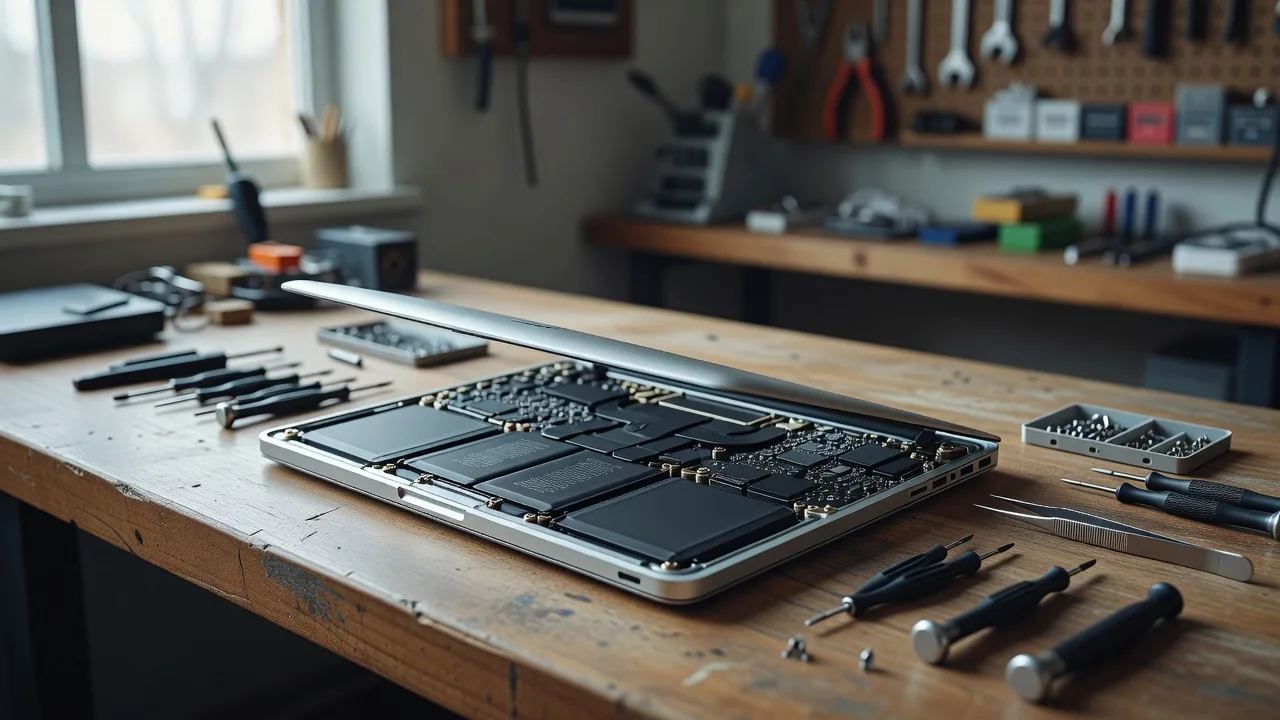
If your MacBook Pro shuts down early, refuses a full charge, or sits unevenly on the desk, the battery is often the culprit—not the charger or “just macOS.”
This guide is for homeowners and small businesses in Western Suburbs, Melton who need a clear path from symptom to fix. You will learn how to spot genuine battery problems, run safe checks at home, and know when DIY stops being wise. When parts, tools, or risk go beyond a careful homeowner job, Fixwebnode MacBook Pro battery replacement is a direct local specialist service—not a freelance marketplace—for inspection, genuine-style battery work, and tidy reassembly.
Why MacBook Pro battery replacement matters
A worn or damaged battery does more than cut runtime. It can cause unexpected shutdowns during meetings, heat under the trackpad, keyboard lift from swelling, and “Service Recommended” warnings that never clear. Left alone, a swollen pack can stress the case, trackpad, and display assembly. Catching the issue early protects the machine you rely on every day and keeps repair scope smaller.
MacBook Pro models from recent years use glued-in battery packs. That design improves thinness but raises the bar for safe removal. Adhesive, flex cables, and the trackpad stack sit close to the cells. Rushing with metal tools is how people crack the bottom case or puncture a cell. The sections below stay practical: inspect first, try software and power checks second, open the chassis only when you are equipped—and book a specialist when you are not.
Can I replace a MacBook Pro battery myself in Western Suburbs, Melton?
Light DIY is fine for diagnosis: check System Settings battery health, test with another charger and cable, and watch for physical swelling. Full cell replacement on glued packs needs proper pentalobe drivers, careful adhesive release, and ESD-safe handling. If the bottom case bows, the trackpad clicks oddly, or health shows “Service Recommended” with sudden shutdowns, book an in-person or drop-off repair rather than forcing the pack out at home.
| Symptom | Quick check at home | When to call Fixwebnode |
|---|---|---|
| Runtime collapses in hours | Note cycle count and energy mode; test known-good USB-C charger | Health is poor and runtime stays short after a full calibrate cycle |
| Case lift or soft trackpad | Place on a flat table; look for rock or keyboard rise | Any swelling, smell, or heat under the palm rest—stop using and book repair |
| Won’t charge or charge drops | Try second cable/port; reset SMC on Intel models if applicable | Port and cable are fine but battery % jumps or won’t hold charge |
| “Service Recommended” | Update macOS; review Battery settings for abnormal drain apps | Message remains and machine sleeps or dies under light load |
Common MacBook Pro battery issues
These problems show up often on machines that travel between home offices and client sites. Each has a different root cause—do not treat them as one generic “battery is bad” label.
1. Sudden shutdowns with high percentage remaining
The menu bar still shows 30–40%, then the MacBook Pro goes dark. After a wall plug-in it boots again. This usually means aged cells can no longer deliver peak current under load, so the system cuts power to protect itself. Cycle count may be high, and Battery Health may already say Service Recommended.
2. Visible swelling or a “soft” trackpad
The laptop rocks on a flat desk, the bottom case bows, keys near the trackpad feel raised, or the click is mushy. Swelling is a physical cell failure—not a software glitch. Continuing to charge a swollen pack is unsafe.
3. Charge stalls, percentage jumps, or no charge with a good cable
You connect a known-good USB-C charger and the icon never changes, or the percentage leaps from 12% to 67% then falls again. Root causes include a failing battery management path, worn cells that confuse the gauge, or—less often—debris in the charge port. You must separate port/cable faults from true pack failure.
4. Extreme heat on the palm rest during light work
Browsing and documents make the area above the battery uncomfortably hot while fans stay quiet or only spin lightly. A degrading pack can run inefficiently and dump heat into the chassis even when CPU load is modest.
How to fix each issue step by step
Fix: sudden shutdowns at mid-level charge
Goal: confirm battery health and rule out heavy background drain before you open anything.
- Go to System Settings → Battery (or Battery on older macOS) and note Health, cycle count if shown, and any Service Recommended message.
- In the same pane, review app energy use over the last 24 hours. Quit or uninstall apps that hold the disk or GPU awake without reason.
- Plug in a known-good USB-C power adapter rated for your model. Charge uninterrupted to 100%, then use the machine on battery down to roughly 20% once. This single calibrate cycle helps the gauge if software drift was the only issue.
- While on battery, run a normal workload (browser, documents). If the Mac still dies above ~25% with no crash log pointing to apps, treat the pack as worn.
- Back up with Time Machine or a full clone before any hardware work. Battery jobs should never start on an unbacked machine.
When to call Fixwebnode: Health stays poor, shutdowns continue after one clean charge cycle, and you need the laptop reliable for work. A specialist can replace the pack, reseat connectors, and verify charging behaviour on the bench—safer than prying glued cells without the right kit.
Fix: swollen battery or distorted case
Goal: stop using the machine safely and prepare for professional pack removal. Do not puncture, bend, or microwave anything.
- Shut down immediately. Do not keep charging a bowed chassis.
- Place the MacBook Pro on a hard, non-flammable surface away from papers and soft bags. Avoid stacking books on the lid to “flatten” it—that stresses the display.
- Visually inspect the bottom case seam and trackpad gap. Photograph the bow for your own records before drop-off.
- If the machine still boots briefly, back up only if it is stable on power and cool to the touch. If it is hot, smells sweet/solvent-like, or the case is sharply deformed, skip further use and move to specialist handling.
- Do not remove the bottom case with random kitchen tools. Swollen cells can vent if stabbed by a metal spudger used as a lever.
When to call Fixwebnode: Any confirmed swelling. Bring the MacBook Pro for in-person assessment or drop-off in the Western Suburbs service area. Expect the technician to disconnect power paths, remove the old pack with controlled adhesive release, fit a correct replacement, and check trackpad and case alignment after closure.
Fix: charging stalls and jumping percentage
Goal: prove whether the fault is cable, port, or battery before booking parts.
- Try a second USB-C cable and a second charger brick that you know works on another device.
- Inspect the MacBook Pro charge port with a bright light. Look for lint or bent contacts. If debris is visible, power off and gently clear with a wooden or anti-static pick—never a metal pin deep in the port.
- Test both (or all) USB-C ports if your model has more than one. Note whether only one side charges.
- On Intel MacBook Pro models, perform an SMC reset using Apple’s documented key sequence for your generation after a full shutdown. On Apple silicon, a full shutdown of 30 seconds and a restart is the practical equivalent check.
- After a clean boot, open Battery settings again. If the percentage still jumps wildly or the machine reports charging while the adapter LED/behaviour shows no draw, the pack or battery board path is the likely fault—not the wall cable.
When to call Fixwebnode: Ports and cables are cleared, SMC/restart checks are done, and charge behaviour is still erratic. Specialist diagnosis separates a simple port clean from a full battery replacement so you do not replace the wrong part.
Fix: palm-rest heat on light workloads
Goal: separate normal CPU heat from battery-area heat and reduce load while you decide on service.
- Feel the chassis: heat centred under the trackpad/palm rest points more toward the battery bay; heat near the hinge vents points more toward CPU/GPU.
- Check Activity Monitor for processes using sustained CPU. Quit runaway tasks so you are not blaming the battery for a stuck compile or browser tab farm.
- Remove thick silicone cases or blocked vents on a desk setup. Ensure the underside has airflow.
- Run on battery for 15–20 minutes of light work. If the palm rest still climbs quickly while CPU graphs stay low, log the behaviour and plan a hardware inspection.
- Do not apply ice packs or liquid coolants to the aluminium shell; thermal shock and moisture risk are real.
When to call Fixwebnode: Heat localises over the battery with low CPU use, or heat appears together with swelling, odour, or rapid drain. An on-site or workshop inspection can confirm whether replacement is required and whether other components were stressed.
When DIY is enough vs when to book Fixwebnode
DIY is enough when: you are only gathering symptoms, swapping chargers, clearing a linty port, reviewing battery settings, completing one calibrate cycle, and taking a full backup. Those steps need no adhesive work and cost only your time.
Book a specialist when: the case is deformed, the trackpad feels wrong, Service Recommended pairs with real shutdowns, charge behaviour stays broken after cable/port checks, or you are not equipped for glued battery removal. MacBook Pro packs are not user-slide-out modules on most Pro models; incorrect leverage can damage the trackpad flex, speakers, or board.
Fixwebnode works as a direct provider for MacBook Pro battery replacement for people across the Western Suburbs service area, including Melton and nearby localities. You can arrange local on-site or drop-off style handling depending on what suits the machine’s condition. Bring the MacBook Pro, its usual charger if you have one, and a note of the symptoms (shutdown percentage, swelling, heat). Keep a current backup on a separate drive when the machine is still stable enough to copy files.
For broader coverage maps and neighbouring regions, see all Fixwebnode service areas. Geography aside, the job itself stays the same: diagnose the pack, replace when needed, and return a machine that charges and sits flat without guesswork.
Book MacBook Pro battery help with Fixwebnode
Do not wait for a swollen pack to lift the keys or for mid-meeting blackouts to become normal. Use the checks above, then talk through what you are seeing with a specialist who handles the hardware directly.
Start a conversation or booking for MacBook Pro battery replacement in the Western Suburbs through Fixwebnode. Describe the model year if you know it, the main symptom, and whether the chassis still sits flat. You will get practical next steps for inspection and repair—without marketplace bids or middle layers—so your MacBook Pro can return to dependable power on the work you actually need to finish.