






 Multi-Vendor & Complex SaaS Marketplaces
 Modern Headless & Jamstack Web Development
 High-End Corporate & Specialized Business Websites
 Advanced API, Checkout & Database Troubleshooting
Remote Smart Home Hub & Router Network Mapping | Melbourne
Stabilise smart-home hubs and map your full router topology for Melbourne homes and small sites—done remotely by us.
We trace dead zones, double-NAT traps, and IoT congestion typical in apartment stacks and mixed retail-warehouse setups, then hand you a labelled map and fix plan. Power up support: dial 0421498927 or use fixwebnode.com.au/contact-support.
Direct Fixwebnode consults with fixed scopes—no marketplace bidding.
About this service
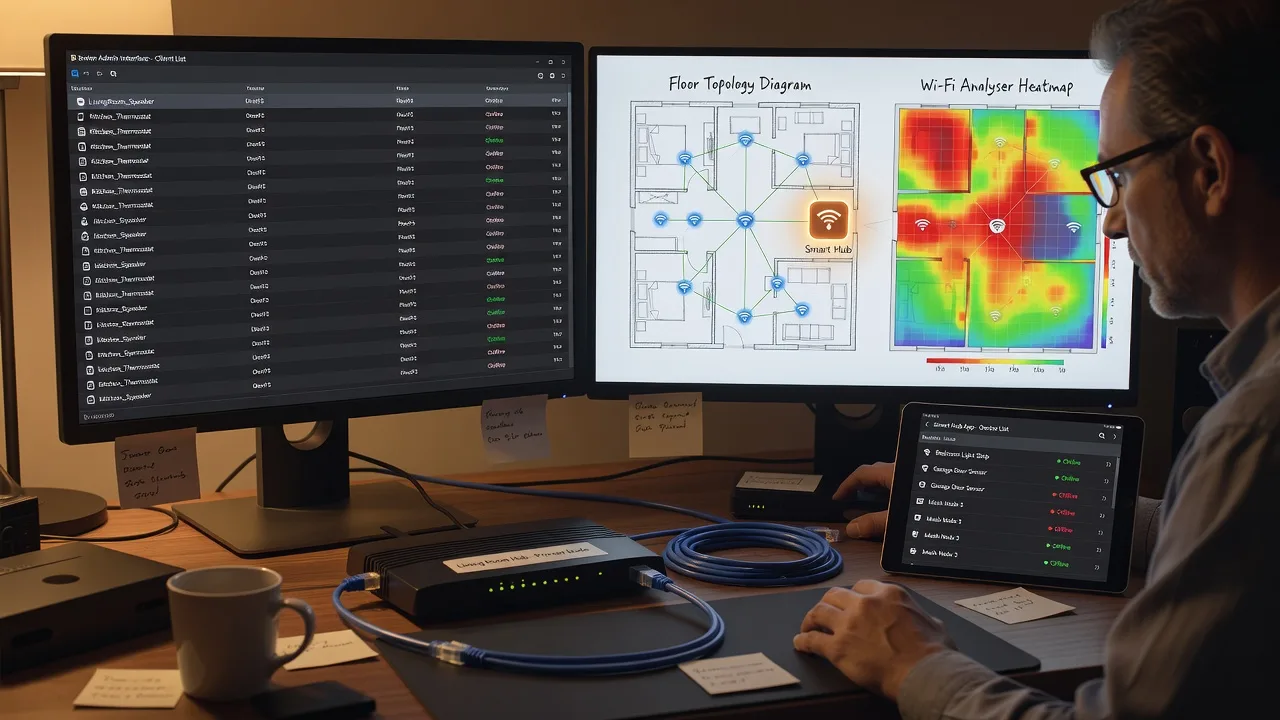
Get a clear, labelled map of your smart-home hubs, routers, and IoT paths so Melbourne sites stop dropping devices and start running predictably. We work remote-first as your direct network specialist—diagrams, config checks, and plain-English next steps you can keep.
What You'll Get
- Full topology map - Visual layout of modem, router, mesh nodes, switches, hubs, and key IoT segments.
- SSID & band plan - 2.4/5/6 GHz roles, guest isolation, and hub-friendly SSID naming that reduces roaming thrash.
- Addressing & DHCP review - Subnet, lease, and reservation gaps that cause random re-joins after power cuts.
- Hub health checklist - HomeKit, Matter, Zigbee/Z-Wave bridges, and cloud hubs checked for backhaul and discovery paths.
- Prioritised fix list - Ranked actions with risk notes so you know what to change first without breaking cameras or locks.
- Handoff notes - Credentials locations (safely redacted), firmware targets, and what to monitor for 7–14 days.
Serving Melbourne & surrounds
Melbourne networks are rarely “one flat Wi‑Fi.” CBD and inner strata apartments share risers and noisy 2.4 GHz; warehouse and light-industrial pockets run cameras, printers, and staff phones on the same uplink; high-street cafés mix POS, guest Wi‑Fi, and smart thermostats. We map those realities remotely and, when useful, align with on-site contacts in places such as Melbourne retail strips or Footscray mixed-use buildings.
- Apartment-dense stacks where mesh nodes fight ISP gateway Wi‑Fi and lifts kill 5 GHz hops
- Warehouse and studio precincts needing camera VLANs without breaking smart locks on the office floor
- Remote session first; optional guided walk-through with your on-site person for cable paths and ISP NTD labels
How We Work
- Step 1: Reach Out - You describe hubs, ISP gear, symptoms (drops, slow cameras, Matter pairing fails). We listen and list access we need (admin login, app screenshots, floor sketch).
- Step 2: Tailored Plan - Fixed-scope quote: Basic map-only, Standard map + config plan, or Premium multi-segment + follow-up. No hourly surprises.
- Step 3: We Deliver - Remote discovery session, live topology capture, hub/router checks, and written map with change sequence.
- Step 4: Confirm & Follow-up - Plain-English handoff; optional re-check after you apply firmware or move nodes.
Common Issues & How to Fix Them
These are patterns we see repeatedly on smart-home and small-site Melbourne networks—symptoms first, safe DIY next, then when to stop and book us.
Smart plugs and sensors vanish for hours after every modem reboot
Usually DHCP lease churn plus hubs that cache stale IPs; common when the ISP gateway and your router both hand out addresses (double NAT or “bridge not really bridged”).
- Step 1: From a laptop, note your default gateway IP and whether the ISP app still shows Wi‑Fi on (gateway still routing Wi‑Fi = double path risk).
- Step 2: Put the ISP unit in true bridge/modem-only if supported; keep one DHCP server only on your main router; reserve IPs for hubs and critical cameras by MAC.
- Step 3: Reboot modem → router → hubs in that order; confirm devices keep the same IP in the router client list after two full cycles.
Matter / HomeKit devices pair on phone hotspot but fail on house Wi‑Fi
mDNS/Bonjour and IPv6 neighbour discovery often break across guest SSIDs, client isolation, or “smart” AP features that block multicast.
- Step 1: Connect the commissioning phone to the same primary SSID/band the hub uses—not guest, not IoT-isolated, not a different mesh hop with isolation on.
- Step 2: Temporarily disable client/AP isolation and “block LAN” on that SSID; ensure IGMP snooping is not dropping mDNS; keep hub and phone on one L2 segment during pair.
- Step 3: After successful pair, re-enable only the isolation rules that still allow hub↔device unicast; retest control from another room and from cellular remote access.
Mesh shows full bars but 4K cameras stutter while lights still respond
Backhaul is saturated or hopping too many times; low-bandwidth IoT survives while video collapses—frequent in long Melbourne terrace/warehouse runs with one weak hop.
- Step 1: In the mesh app, note which node each camera uses and whether backhaul is wireless or Ethernet; walk a continuous speed test toward the gateway.
- Step 2: Prefer Ethernet backhaul for the node nearest cameras; if wireless only, add a dedicated mid-hop with clear LOS and separate 5 GHz backhaul SSID if the vendor allows.
- Step 3: Re-run a 2-minute camera stream and a parallel light toggle; success = stable bitrate with light latency under ~100 ms on the same SSID plan.
When DIY is not enough (urgent, unsafe, recurring, or burning time), book Fixwebnode for direct professional support—no freelancers, bidding, or marketplace noise.
Expert Insights
Melbourne apartment tip we use after hundreds of hub recoveries: before buying another mesh node, force a 15-minute “single AP” test. Park one strong dual-band AP near the hub, turn off every other mesh radio, and only then measure Matter pair success and camera bitrate. Multi-hop mesh often masks a worse problem—ISP gateway Wi‑Fi still broadcasting the same SSID, or a strata riser AP your devices prefer at −75 dBm. If single-AP fixes discovery but multi-hop breaks it, the fix is SSID hygiene and Ethernet backhaul on the camera wing—not a third satellite. Track a simple metric: pairing success rate over five attempts and 95th-percentile stream stall seconds; if stalls stay above ~2 s after band steering is off, map VLANs and multicast next, not more consumer mesh marketing features.
Why Choose Fixwebnode
We deliver the mapping and remediation ourselves as a direct infrastructure provider—not a board of bids. You get technical depth on hubs and routing with calm, jargon-light handoff notes suited to owners, office managers, and clinic admins across Melbourne.
- ✓ Remote-first discovery that still respects real building constraints (strata risers, warehouse runs, café POS uptime)
- ✓ Fixed package scopes with topology artefacts you keep—not vague “hours of advice”
- ✓ Direct path to support via 0421498927 and fixwebnode.com.au/contact-support when issues recur after firmware or ISP changes
Tools & Technologies
Router and mesh admin UIs (UniFi, TP-Link Omada/Deco, Asus, eero, Google/Nest, Apple HomePod hubs, SmartThings, Hubitat, Home Assistant), Wi‑Fi analyser readings, DHCP/lease tables, VLAN/SSID plans, mDNS/Matter path checks, speed and latency tests, labelled diagrams (exportable map + change log), secure remote session tools, firmware compatibility notes for modem-router pairs common on Australian NBN setups.
Perfect For
Melbourne homeowners, strata owner-occupiers, boutique retailers, and small offices who added cameras, locks, and voice hubs piece by piece and now need one coherent map. Ideal when staff or family cannot tell which box is the “real” router, or when a recent ISP swap broke automations. We stabilise infrastructure first so human users stop fighting the network.
Choose a package
Remote discovery session with a single-site topology sketch and top three fix priorities.
Full map, SSID/band plan, DHCP review, and written change sequence for one primary site.
Multi-segment mapping, VLAN/IoT isolation plan, implementation guidance, and post-change re-check.
FAQ
Yes. We specialise in remote mapping for Melbourne homes and small sites. You (or an on-site contact) share admin access, photos of the NTD/modem stack, and a rough floor sketch. When a cable path or ISP bridge mode must be confirmed in person, we guide your person step by step so travel is optional, not required.
Router/mesh admin login, hub app access (view-only is fine at first), ISP account notes if gateway mode is unclear, a list of critical devices (locks, cameras, POS), and whether guest Wi‑Fi or VLANs already exist. We never ask you to post credentials in public forms—share via the secure channel we agree on after booking.
Basic is map-and-advise only unless you explicitly approve a low-risk toggle. Standard and Premium include an agreed change window with a rollback order (for example re-enabling a second SSID). We avoid touching lock and alarm paths until discovery and pairing behaviour are understood.
Yes. A large share of Melbourne dropouts we see come from dual DHCP or Wi‑Fi still active on the ISP unit. We document whether bridge/modem-only is available and design around the gear you already own before recommending replacements.



