







 Multi-Vendor & Complex SaaS Marketplaces
 Modern Headless & Jamstack Web Development
 High-End Corporate & Specialized Business Websites
 Advanced API, Checkout & Database Troubleshooting
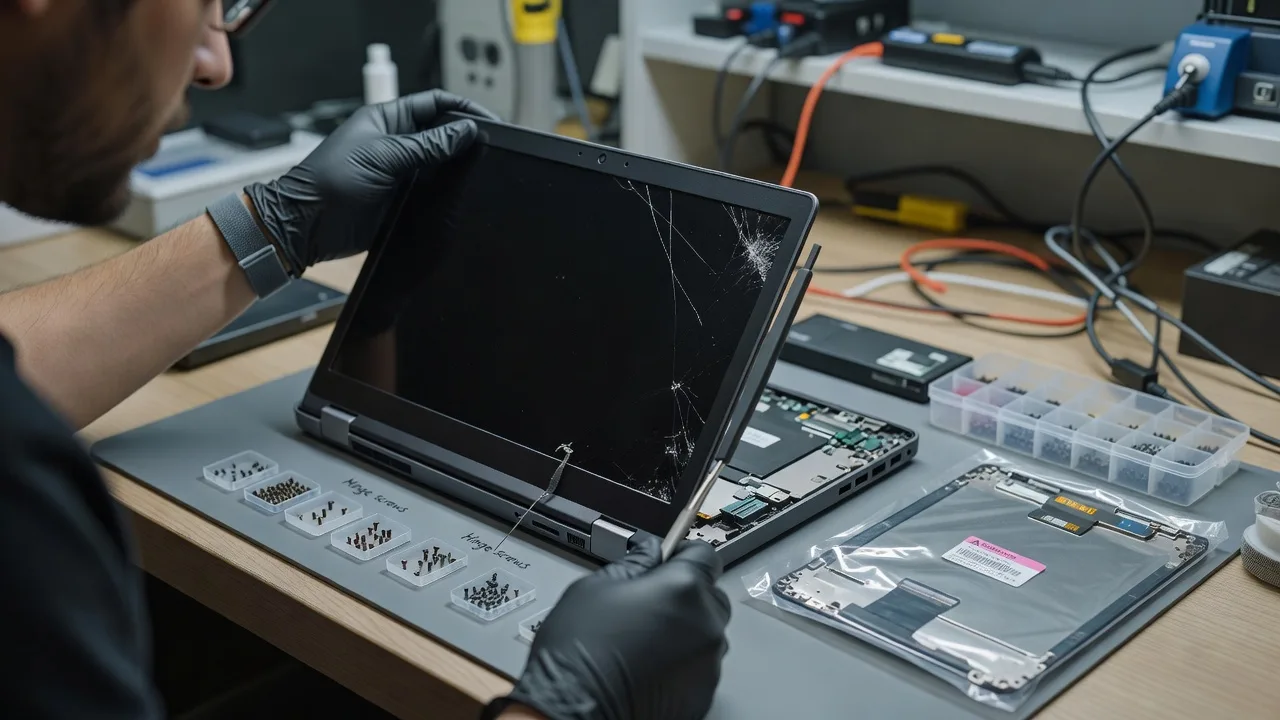
Laptop Screen Replacement for Dell, HP, Lenovo & ASUS
Cracked or black laptop screen? We replace Dell, HP, Lenovo & ASUS panels with remote-first diagnosis Australia-wide.
Home-office workers, students, and small teams get clear model matching, safe strip-down guidance, and fixed-scope repair paths—no marketplace bidding. We confirm panel type, flex cable risk, and hinge strain before any parts move.
Ready to restore a usable display? Contact Fixwebnode support or chat with us to power up your repair plan.
- Brand-accurate OEM/compatible panels
- Remote intake photos & serial checks
- Patient, jargon-free walkthroughs
About this service
Get a clear, usable laptop display again with direct screen replacement support for Dell, HP, Lenovo, and ASUS—built for remote clients who need technical accuracy without confusing jargon. We diagnose the real fault first so you do not buy the wrong panel or force a hinge that cracks the new glass.
What You'll Get
- Model-true panel matching - Exact resolution, connector type (40-pin eDP vs older LVDS), matte/gloss, touch vs non-touch, and bezel fit confirmed before ordering.
- Damage triage report - LCD crack only, digitizer-only, backlight strip, or GPU/cable failure separated so you pay for the right fix.
- Guided or full replacement path - Video-assisted DIY for confident users, or end-to-end replacement coordination with quality checks.
- Post-fit calibration checks - Dead-pixel scan, brightness uniformity, lid-close sleep test, and external-monitor fallback verified.
- Data-safe workflow - No OS reinstall required for a pure panel job; we avoid unnecessary drive work unless you request it.
- Plain-English handoff notes - What failed, what was replaced, and how to spot hinge or cable strain early next time.
Serving Remote clients & surrounds
This page exists for remote and Australia-wide laptop owners who cannot wait weeks on a vague quote—especially Dell Latitude/Inspiron, HP EliteBook/Pavilion, Lenovo ThinkPad/IdeaPad, and ASUS VivoBook/TUF units used in home offices, clinics, and study desks. We treat remote intake seriously: clear photos of the bezel, serial/service tag, and failure under power tell us more than a generic "screen broken" ticket.
- Apartment and strata home offices where a cracked lid still has to run telehealth or end-of-month accounts the same day
- Café-strip freelancers and warehouse-admin laptops that take bag knocks and need matte panels that hide glare on shared benches
- Remote-first access: photo and video diagnosis first, then parts logistics or on-camera replacement support timed to your timezone—no need to invent a local suburb just to get help
How We Work
- Step 1: Reach Out - Tell us the brand, exact model or service tag, what you see (lines, ink-spread cracks, black but glowing, no image on lid but fine on HDMI), and whether the touch layer still works. We listen before we prescribe parts.
- Step 2: Tailored Plan - You receive a fixed-scope path: DIY-guided swap, standard panel replacement package, or premium IPS/touch assembly—with inclusions stated up front in AUD.
- Step 3: We Deliver - Remote diagnostics, panel sourcing guidance, and either patient video support through the bezel screws and cable seat, or coordinated full replacement with functional testing.
- Step 4: Confirm & Follow-up - We confirm brightness keys, webcam ribbon (if disturbed), and lid sensor behaviour, then leave short care notes and an optional check-in if flicker returns.
Common Issues & How to Fix Them
These are the failures we see constantly on Dell, HP, Lenovo, and ASUS lids—not generic "buy a new laptop" advice.
Spider-crack with black blotches but the laptop still boots to sound
Impact damage liquid-crystal layers; the GPU and OS are often fine, so replacing the whole machine wastes money if the motherboard is healthy.
- Step 1: Connect an external monitor or TV via HDMI/USB-C. If the desktop appears externally, the fault is almost certainly the lid assembly—not a dead motherboard.
- Step 2: Note whether touch still works on the cracked area (digitizer may be separate on some convertibles). Photograph the full bezel, corners, and any ink-like purple stains under the glass.
- Step 3: Match the replacement by native resolution and connector—not only diagonal inches. After fit, boot to a solid grey wallpaper and check for pressure spots near the bottom cable entry.
Image flickers when you open the lid past 90 degrees
Usually a fatigued eDP/LVDS cable in the hinge nest or a connector that has walked out a fraction—common after years of one-handed lid lifts on ThinkPads and Latitude frames.
- Step 1: With the laptop on a static logo or solid colour, slowly open and close the lid. If flicker correlates with a specific angle, suspect cable pinch—not random software.
- Step 2: Power off, remove mains and user-accessible bottom screws only if your model allows safe entry, and reseat the display cable at the board end if it is reachable without full teardown. Do not force plastic latches.
- Step 3: If flicker remains after a careful reseat, replace the dedicated display cable with the panel still known-good, then retest the same open-angle sweep before ordering a second panel.
Very dim or black screen, but you can faintly see the desktop with a torch
Backlight or LED-strip / power-rail issue: the LCD may still be imaging while the light source or its fuse line has failed—different part family from a shattered LCD.
- Step 1: Shine a bright torch at an angle on the panel in a dark room. If ghost icons appear, the panel glass may be alive and the backlight path is the prime suspect.
- Step 2: Check brightness Fn keys and Windows/macOS brightness slider, then boot once with external display to confirm the GPU outputs a full image.
- Step 3: Only order a full LCD if torch test shows shattered crystals or heavy bleeding; otherwise source the correct LED strip / complete lid assembly specified for your service tag and retest maximum brightness uniformity after install.
When DIY is not enough (urgent work laptop, unsafe glass shards, recurring flicker after a DIY cable seat, or you are burning hours on the wrong part number), book Fixwebnode for direct professional support—no freelancers, bidding, or marketplace noise.
Why Choose Fixwebnode
We are a direct provider: Tier-1 technical depth for connector types, BIOS lid quirks, and brand service tags, plus Tier-2 human clarity so non-technical owners are never left guessing which screw pile is which. Remote clients get structured intake instead of a parts lottery.
- ✓ Brand coverage locked to Dell, HP, Lenovo, and ASUS panel families we actually diagnose weekly
- ✓ Fixed-scope packages in AUD—diagnosis, guided swap, or full replacement path stated before you commit
- ✓ Empathetic remote coaching for NDIS, aged-care, student, and small-business users who need the machine back without lecture-tone jargon
Tools & Technologies
Service-tag / serial decoders for Dell and HP, Lenovo FRU lookups, ASUS part cross-references, eDP 30/40-pin identification, ESD-safe opening picks and suction workflow guidance, external HDMI/USB-C display validation, solid-colour pixel tests, webcam and lid-sensor ribbon awareness, and photo/video remote intake checklists.
Perfect For
Remote workers, clinic admin staff on telehealth laptops, students mid-semester, and small businesses that cannot freeze invoicing because a bag-zip cracked an Inspiron or EliteBook lid. Ideal when you want one accountable provider to separate panel vs cable vs backlight and walk you to a working screen—whether you need calm DIY coaching or a complete replacement scope.
Start your screen repair plan at fixwebnode.com.au/contact-support—message or chat and we will map the next safe step for your exact model.
Choose a package
Remote diagnosis, exact panel/cable ID for your Dell HP Lenovo or ASUS, and a written fix plan with DIY risk notes.
Full replacement support path: parts confirmation, step-by-step remote guided install, and post-fit display verification.
Priority end-to-end screen restoration with premium panel guidance, extended testing, and follow-up session if flicker or lid sensor issues appear.
FAQ
Yes. Location is remote-first: we start with structured photo, video, and service-tag intake from anywhere you can get a stable connection. You get a direct Fixwebnode plan—diagnosis, guided replacement, or full-scope support—without needing a shopfront suburb on the booking form.
Usually yes from symptoms plus a few tests. Angle-linked flicker often points to the hinge cable; torch-visible ghost image with a black lid points to backlight; spider cracks with ink blotches point to the LCD itself. We separate those before you spend on parts.
A standard panel or cable replacement does not require wiping the drive. We keep the job mechanical and display-focused. Only if you separately request storage work would data handling enter the scope, and we would say so explicitly first.
Brand and exact model or service tag, clear photos of the damage and bezel corners, whether an external monitor works, and whether touch still responds. That lets us lock connector type and avoid the wrong 15.6-inch panel with a different resolution or bracket.



